From “who paid what?” to all square, in three steps
You can learn ttmm in about a minute. Here’s the whole thing, step by step, with the real screens.
1. Make a group
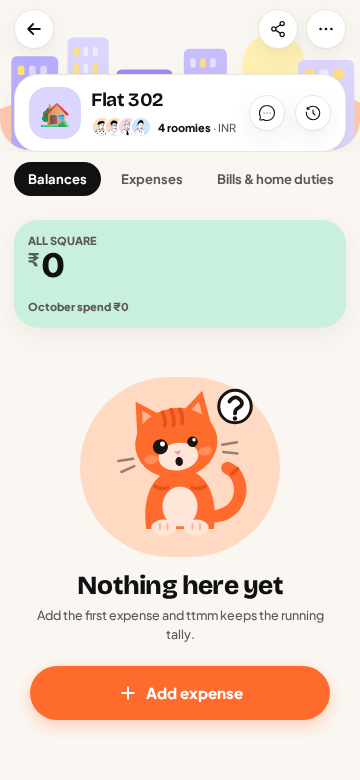
Tap Create group, give it a name like “Flat 302” or “Goa Trip ’26”, and pick a type (flat, trip, couple, office or other). Add people by name, from your contacts, or with an invite link. They don’t need the app yet.
2. Add what you spend
Whoever pays adds it: tap +, type the amount, add a word or two, save. For anything unusual (someone skipped it, two people paid, it was in dollars) tap the pills under the amount. See all the ways to split.
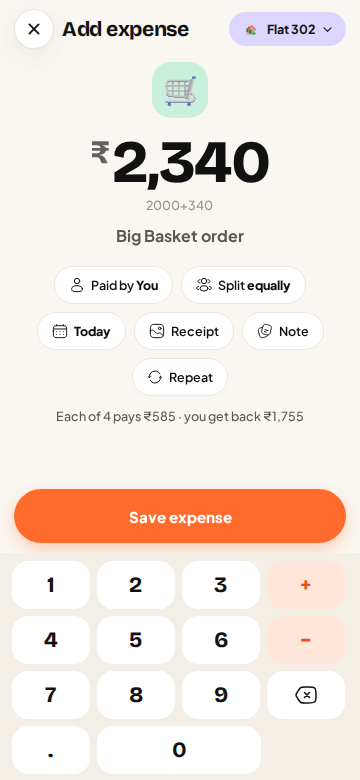
Things that repeat, like rent and WiFi, can be added once as recurring bills.
3. Settle up
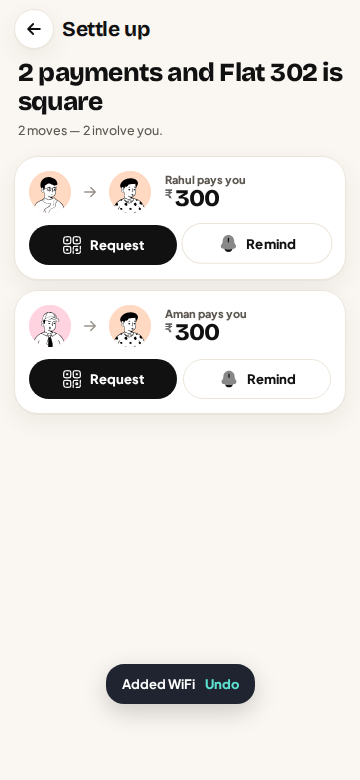
The group screen always shows who owes whom, simplified to the fewest payments. When it’s time to settle, tap Settle up and ttmm opens your UPI app with the right person and amount. Or tap Request to send a QR to someone who owes you.
That’s it. A few habits that help
- Add it when you pay. Expenses added at the counter are never forgotten.
- Settle monthly. Pick a day (the 1st, or payday) and settle the group every month.
- Use the chat. Questions about an expense go in the group chat, next to the money.
- Meow, don’t nag. A Meow is friendlier than a reminder text.
New to sharing a flat? Read our money rules for flatmates before you move in.
Questions
How long does it take to set up ttmm?
About a minute: make a group, add your flatmates by name, and add your first expense.
Does everyone need to install the app?
No. People can be added by name and join later from Android or the web.