Split any expense the way it actually happened
Not every bill is a neat three-way split. Someone skipped dessert, two people paid, the WiFi is shared by four but the AC by two. ttmm handles all of it in a few taps.
Start with the amount
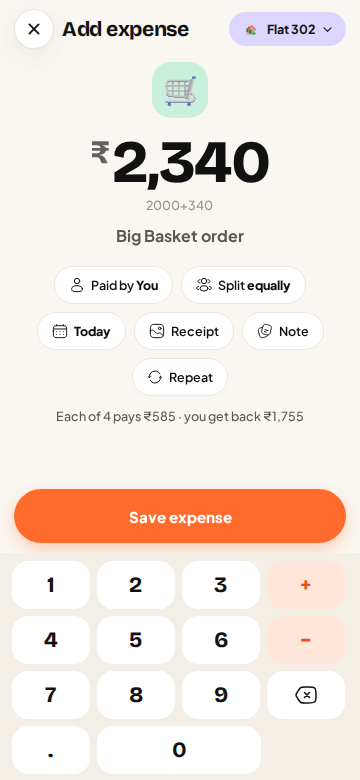
Adding an expense starts on a big calculator keypad, because the amount is the one thing you always know. Type it, add a short description like “Big Basket order” or “Swiggy dinner”, and you’re already done for an equal split. ttmm fills in today’s date, assumes you paid, and splits it equally between everyone in the group. You can change any of those with one tap on the pills under the amount.
Six ways to split
Tap Split equally to open the split sheet. Each way of splitting answers a different real-life question:
| Split | Use it when | Example |
|---|---|---|
| Equally | Everyone shared it the same | ₹1,200 WiFi between 4 = ₹300 each. Untick anyone who wasn’t part of it. |
| Amounts | You know exactly what each person owes | Rent where rooms are priced differently: ₹18,300 / ₹13,350 / ₹13,350. |
| % | You agreed on a ratio | Electricity 40% / 40% / 20% because one room has no AC. |
| Shares | Some people had more | Rahul had 2 plates, others had 1: shares 2:1:1. |
| Adjust | Equal, plus or minus a little for someone | Groceries equal, but Neha adds ₹60 for her protein bars. |
| Items | A long bill where people had different things | A restaurant bill, item by item, with tax and tip spread fairly. |
As you type, the sheet keeps a running check at the bottom (“Adds up across 4”, or “₹120 left to assign”) so you can’t save a split that doesn’t add up to the bill.
Item by item, with tax and tip done properly
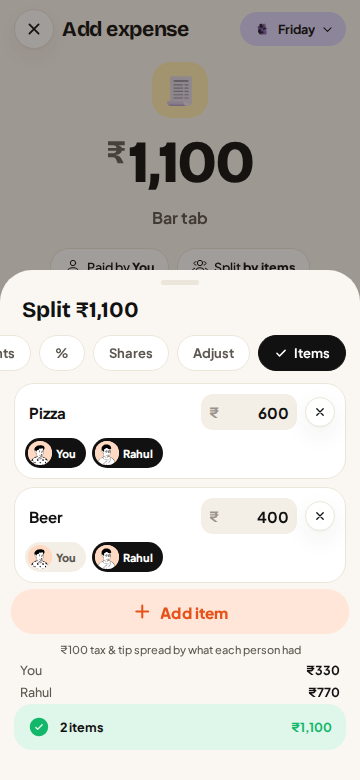
Restaurant bills are where most splits go wrong. With Items, add each line from the bill (Pizza ₹600, Beer ₹400…) and tick who had it. If the bill total is higher than the items because of GST or a tip, ttmm spreads the difference in proportion to what each person ate, not equally. So the person who had a ₹100 coffee doesn’t pay the same tax as the person who had a ₹900 platter. The expense keeps the item list, so anyone can open it later and see exactly why they owe what they owe.
When more than one person paid
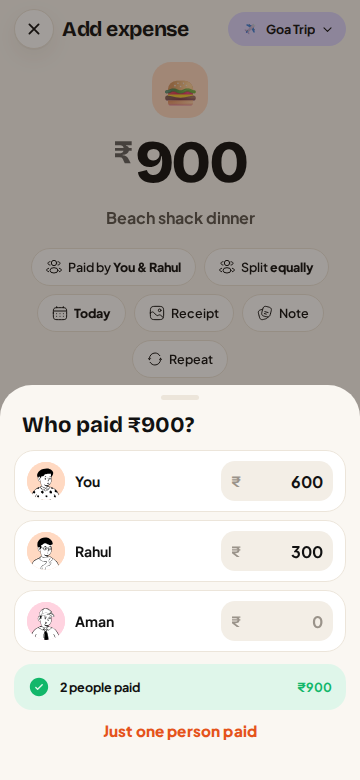
Cards get declined, UPI limits run out, and sometimes two people split the payment at the counter. Tap Paid by and choose Multiple people, then enter how much each person paid. ttmm checks that the payments add up to the bill (“2 people paid ₹900”) and works out everyone’s balance from both sides: what they paid and what they owe.
Receipts, notes and the date
Every expense can carry a photo of the receipt, a note (“includes Rahul’s extra cheese”) and a different date if you’re adding it late. Anyone in the group can comment on an expense or react to it, which settles most “what was this ₹840 for?” questions without a single phone call.
It warns you about duplicates
When two flatmates both add the same Zepto order, the balances go wrong quietly. If you add an expense that looks like one already in the group (same amount, close in time), ttmm asks before saving it twice.
Edits are tracked
Expenses can be edited by anyone in the group, and every change is recorded: who changed what, from what, and when. Open an expense and tap History to see it. Nobody can quietly change a number.
Tips from real flats
- Agree on the default once. Most flats split groceries equally and only use Shares or Items for meals out. Agree on that when you move in.
- Use Items for anything over ₹2,000. The bigger the bill, the more an equal split hides.
- Split the AC, not the bill. For electricity, split a base amount equally and only the extra by AC use. Our electricity calculator does the maths.
Questions
Can I split an expense between only some people in the group?
Yes. In an equal split, untick anyone who wasn’t part of it. In the other modes, give them 0.
How does ttmm handle tax and tip when splitting by items?
The difference between the bill total and the items is shared in proportion to what each person had, so bigger orders carry more of the tax and tip.
Can two people pay for one expense?
Yes. Choose Paid by → Multiple people and enter what each person paid. The amounts have to add up to the bill.
Is there a limit on how many expenses I can add?
The free plan has up to 7 entries a day: 3 free, 2 with a short ad, and 2 from saved entries. ttmm Pro has no limit.